Customer insight. Developer context. Strategic clarity.

The operating system for AI-driven teams.

Turn customer needs into clear plans, give AI developers the context to build correctly, and keep leadership focused on the right priorities.

See how ProdMoh works

From “customers are stuck” to a reviewed release.

Illustrative walkthrough

See how an onboarding issue moves through ProdMoh—and what each team receives along the way.

  1. 01 Customer team

    Bring in the signal

    Customer feedback

    “I invited my team, but nobody received the email.”

    Customer Pulse → Opportunity

    Make invitation status visible and let users retry failed invites.

    Your team reviews the idea and the strategic, market, and execution signals in ProdMoh Score.

  2. 02 Product + business

    Define the change

    PRD + acceptance criteria

    Show pending, delivered, and failed invitations. Let an admin resend a failed invite.

    Generated guardrails + eval plan

    Restrict resends to admins. Prevent duplicate invitations. Test the retry flow.

    Your team reviews the generated scope, constraints, and checks before development.

  3. 03 Developer + Claude

    Build with the context

    In your MCP-connected tool

    “Load the invitation PRD and stories. Review the requirements and guardrails before implementing retry.”

    ProdMoh MCP → Coding assistant

    PRD context + user stories
    Acceptance criteria + constraints

    The developer accesses saved context in Claude or Cursor and reviews the implementation there.

  4. 04 Release owner

    Review before launch

    Release evidence

    • Admin-only access: pass
    • Duplicate prevention: pass
    • Retry flow: evidence needed

    Human decision

    Hold for retry evidence. Once approved, draft launch notes from the agreed scope.

    Check code risks with Code X-Ray. Review test evidence in Release Gate before approving the release.

Across the workflow

Leadership stays in Product Canvas.

Business goalImprove team activation
Proposed initiativeReliable team invitations

Review goal alignment, portfolio concentration, and open decisions in the Strategic Brief and Decision Queue.

Decision Intake

Where should AI improve your work?

auto_awesome Anonymous preview

Try One Of These

Preview the tradeoffs and missing evidence. Then turn the decision into a product spec with clear scope and success criteria.

Try a preview without an account. Sign in to save context, import requirements, and continue into planning and launch readiness.

From decision to delivery

Give every team a clear next step.

looks_one
Try a real decision

Enter something you are actively debating. ProdMoh gives you a fast preview of the tradeoff, the likely call, and what is still unclear.

looks_two
Turn it into evidence

Instead of generic advice, ProdMoh narrows the decision, surfaces the missing evidence, and points to the spec that should exist next.

looks_3
Prepare teams to execute

Build a product spec from the decision, then connect acceptance criteria, release evidence, and launch materials as work progresses.

Decision Preview → Product Spec → Launch Readiness

Estimate the opportunity

See where your team could get time back.

Compare the work you do today with your expected effort using ProdMoh. Adjust each scenario to match your team, including review and correction time.

Illustrative assumptions, not industry benchmarks or measured ProdMoh results. These estimates do not predict bug reduction or time to market.

Requirements preparation

Turn customer feedback into a PRD, acceptance criteria, and guardrails for team review.

Hours per feature

80 hours potentially freed

67% less effort per feature in this scenario.

Calculation: current hours − expected hours. No savings are guaranteed.

Developer clarification

Make requirements and user-story context available through MCP instead of repeatedly preparing handoffs.

Hours per developer / week

3 hours potentially freed

60% less effort per developer / week in this scenario.

Calculation: current hours − expected hours. No savings are guaranteed.

Executive reporting

Use Product Canvas and Strategic Brief to prepare a shared view of priorities, alignment, and open decisions.

Hours per team / week

4 hours potentially freed

67% less effort per team / week in this scenario.

Calculation: current hours − expected hours. No savings are guaranteed.

Each card uses a different unit. Estimates are shown separately and are not added together.

Shared context. AI-assisted work. Human decisions.

Make AI useful across the teams delivering change.

For companies investing in AI to improve productivity and quality: connect what matters to the business with what teams and their AI tools need to deliver.

Leadership & strategy

Use ProdMoh Score to inform prioritization with strategic, market, and execution signals. Review tradeoffs and ownership gaps through the Strategic Brief and Decision Queue.

Explore the decision workspace →

Operations & customer teams

Use Customer Pulse to synthesize customer feedback and recurring friction into priorities and requirements. Give teams useful context before they build with AI.

Explore customer insights →

Sales & go-to-market

Use AI to draft release notes, sales materials, and enablement content from the agreed launch scope. Give your team a starting point to review and refine.

Explore launch preparation →

Product & engineering

Bring PRD and user-story context into MCP-compatible coding tools. Build from shared requirements and generated guardrails, then review release evidence and Code X-Ray findings.

Explore Code X-Ray →

Capabilities behind the workflow

What your business gets at each step.

From choosing the right problem to preparing a release, each capability produces something the next team can use. Here is where it fits and the work it helps you do.

01 · Customer signal

Find the customer problems worth solving

Customer Pulse

Turn collected feedback into themes, ideas, and opportunities your team can review before committing development time.

Workflow handoff: Customer evidence → proposed initiative

Explore customer insights →
01 · Prioritization

Make investment decisions with more context

ProdMoh Score

Assess strategic, market, and execution signals alongside team judgment. Surface where an idea needs more clarity before it becomes a commitment.

Workflow handoff: Proposed initiative → informed priority decision

Explore idea assessment →
02 · Scope and requirements

Give teams a shared definition of the work

PRDs, user stories & acceptance criteria

Turn an idea into requirements, user stories, and explicit acceptance criteria that business and engineering teams can review together.

Workflow handoff: Agreed priority → development-ready scope

Explore requirements →
02 · Quality planning

Set quality expectations before development

PRD-generated guardrails & evaluation plans

Generate implementation constraints and validation checks with the PRD. Review them early so developers know the boundaries and how the work will be evaluated.

Workflow handoff: Requirements → reviewed constraints and checks

Explore guardrails →
03 · Developer productivity

Keep requirements within reach of AI developers

MCP context for Claude, Cursor & other clients

Access saved PRD and user-story context inside compatible AI tools. Reduce repeated handoff preparation and give coding assistants the intent behind a task.

Workflow handoff: Reviewed requirements → context in the coding tool

Explore developer context →
04 · Release confidence

Make release decisions from evidence

Code X-Ray & Release Gate

Review implementation risks, test status, and attached evidence. Give the release owner a clear basis to approve, block, or defer the change.

Workflow handoff: Implementation → evidence and a release decision

Explore code review →
04 · Launch preparation

Prepare customer-facing teams for what ships

Launch Generator & AI Deck Builder

Draft release notes, sales enablement, and training material from agreed scope. Turn source documents into presentations for team review.

Workflow handoff: Approved scope → launch and communication drafts

Explore launch preparation →
Across every stage · Leadership

Keep delivery aligned with business strategy

Product Canvas, Strategic Brief & Decision Queue

See portfolio concentration, goal alignment, ownership gaps, and pending decisions. Give executives a shared view of where effort is going and what needs attention.

Workflow handoff: Portfolio context → priorities and leadership decisions

Explore the strategy workspace →

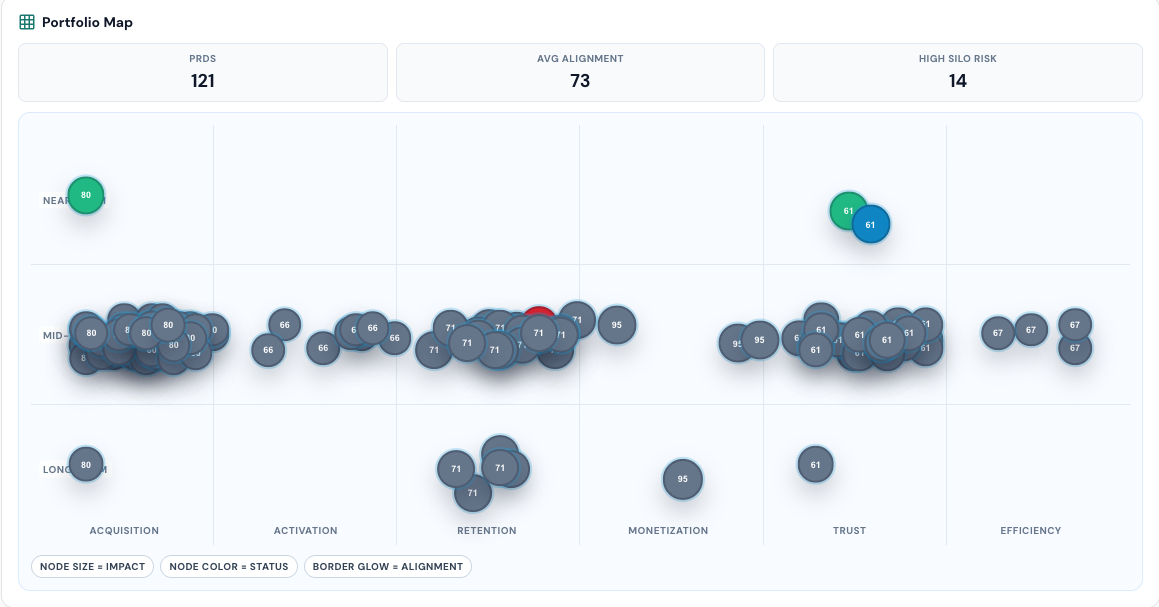
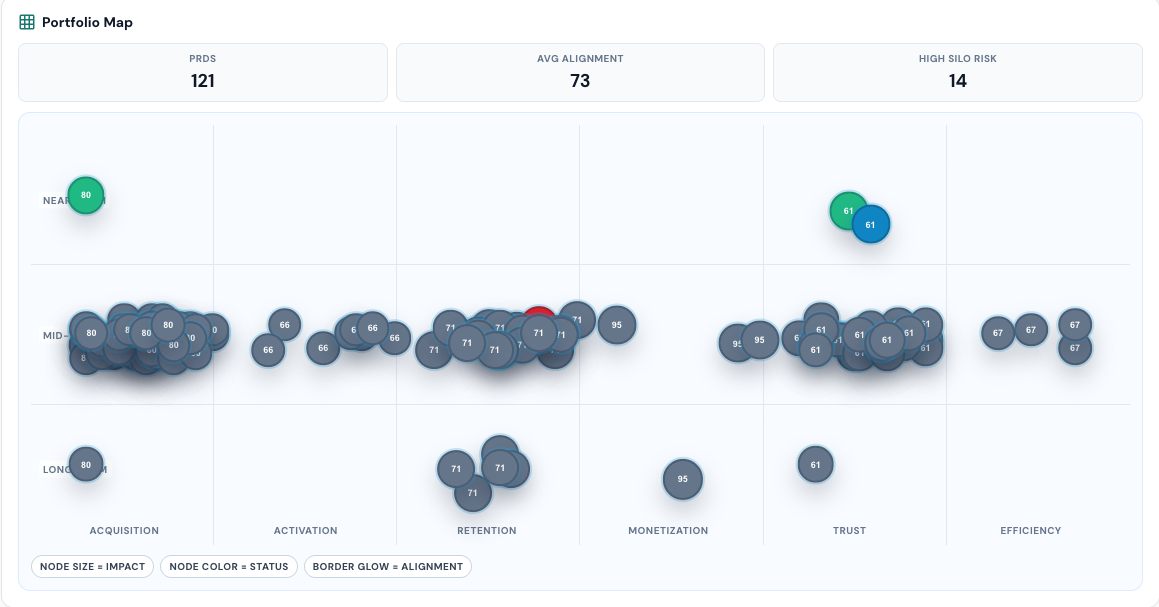
See the bigger picture in Product Canvas.

Review how planned work is distributed across priorities and time horizons, then use that view to guide your next strategy discussion.

Open Product Canvas →
ProdMoh Product Canvas portfolio roadmap showing planned initiatives across themes and time horizons

Product Canvas preview · Select the image to view it at full size.

FAQ

Questions Teams Ask

Does ProdMoh replace our AI tools?

No. ProdMoh provides business context, requirements, and review workflows around AI-assisted delivery. Teams can use MCP-compatible coding tools alongside it, while people review evidence and make release decisions.

How does ProdMoh help me decide what to ship, block, or defer?

Product Canvas, Strategic Brief, and Decision Queue show what to approve, block, or defer based on goals, risk, ownership, and evidence.

Can I see if our roadmap is over-indexed on one theme?

Yes. Product Canvas maps PRDs across acquisition, retention, monetization, trust, and efficiency so concentration risk is visible.

How does release approval work in ProdMoh?

Release Gate tracks scenario status, evidence uploads, and risk flags, then gives a clear approve, block, or defer path before launch.

Can business teams use this without writing code?

Yes. Business teams can run the workflow in UI, while engineering can use MCP and Code X-Ray for deeper technical review.

Does ProdMoh support engineering workflows too?

Yes. ProdMoh supports MCP integrations for Cursor, Windsurf, and Claude Desktop, plus Code X-Ray for diff risk analysis.

What can we generate after a release is approved?

Launch Generator creates release notes, GTM outlines, sales enablement content, and training material from approved shipped scope.

Who is ProdMoh for?

Leaders review priorities and tradeoffs. Operations and customer teams contribute business context, while product and engineering teams turn decisions into requirements, release evidence, and launch plans.

How quickly can a team get value from ProdMoh?

Most teams can start in minutes by using existing PRDs and stories to generate a product canvas view, strategic brief, and decision workflow.

Give your AI-driven teams a shared way to work.
Start with one real decision.

Start with a business decision. Turn it into a product spec, review the tradeoffs, and give every team a shared foundation for planning, delivery, and launch.

Import an existing PRD or generate a product spec in ProdMoh to unlock the full decision brief, Product Canvas, release decisions, and launch workflows.

ProdMoh overview

ProdMoh connects business context, AI-ready requirements, quality checks, and launch preparation for companies using AI to improve team productivity and delivery quality.

Supported environments include Cursor, Windsurf, Claude Desktop, and other MCP-compatible clients.

Core use cases include Product Canvas, Strategic Brief, Decision Queue, launch readiness, cross-team alignment, and diff risk analysis with fix branch generation when needed.